A sales invoice is an essential business document that records a transaction and formally requests payment from a customer. Whether you sell physical products, provide professional services, or operate a small business, creating accurate invoices helps you manage payments, maintain financial records, and keep transactions organized.
Beyond requesting payment, a sales invoice provides written evidence of what was sold, how much the customer owes, and when payment is expected. It also helps businesses track outstanding balances, prepare financial statements, and maintain documentation for accounting and tax purposes.
Understanding how a sales invoice works can make your billing process more professional and efficient. In this guide, you will learn what a sales invoice is, what information it should contain, how to create one, and how to avoid common invoicing mistakes.
What Is a Sales Invoice?
A sales invoice is a commercial document issued by a seller to a customer after providing goods or services. It lists the products or services purchased, their quantities, individual prices, applicable taxes, and the total amount due.
The main purpose of a sales invoice is to formally request payment and document the financial details of a transaction. Once issued, it becomes an important record for both parties.
For sellers, an invoice helps track sales revenue and outstanding payments. For buyers, it provides documentation of purchases and supports expense management and bookkeeping.
A sales invoice typically includes:
- Seller’s business name and contact information.
- Customer’s name and billing address.
- Unique invoice number.
- Invoice date and payment due date.
- Description of products or services sold.
- Quantity and unit price of each item.
- Subtotal, discounts, and applicable taxes.
- Total amount payable.
- Payment instructions and terms.
Why Is a Sales Invoice Important?
Using sales invoices consistently provides several benefits for businesses. It improves payment management, creates reliable transaction records, and helps establish clear expectations between sellers and customers.
1. Provides a Formal Payment Request
A sales invoice clearly communicates how much a customer owes and when the payment should be made. Instead of relying on verbal agreements or informal messages, businesses can provide a professional document containing all relevant payment information.
2. Creates a Record of Business Transactions
Invoices help businesses document completed sales and services. These records can be used to review previous transactions, verify customer purchases, and investigate payment discrepancies.
3. Supports Financial Bookkeeping
Sales invoices help business owners monitor revenue, accounts receivable, and customer payment histories. They also provide supporting documentation when preparing financial reports and reconciling accounting records.
4. Helps With Tax Documentation
Depending on local regulations, sales invoices may serve as supporting documents for tax reporting and compliance. They can help businesses identify taxable sales, applicable tax amounts, and transaction dates.
However, an ordinary sales invoice is not automatically a valid tax invoice in every jurisdiction. Businesses should follow their local invoicing and tax requirements.
5. Helps Resolve Payment Disputes
A detailed invoice provides written evidence of the agreed products, services, quantities, prices, and payment terms. This information can help resolve misunderstandings between buyers and sellers.
What Should Be Included in a Sales Invoice?
A professional sales invoice should contain enough information for customers to understand the transaction and complete their payments without confusion.
Seller and Customer Information
Start by identifying both parties. Include the seller’s business name, address, phone number, and email address. Add the customer’s name, billing address, and other relevant contact details.
Invoice Number and Dates
Assign a unique invoice number to every document. Sequential numbering makes invoices easier to organize, retrieve, and track.
Include these dates:
- Invoice Date: The date the invoice is issued.
- Due Date: The deadline for completing payment.
- Service or Delivery Date: The date goods were delivered or services were performed, when relevant.
Product or Service Description
List each item or service separately. Include a clear description, quantity, unit price, and line total. Specific descriptions help customers verify what they are being charged for.
Subtotal, Taxes, and Total Amount
Calculate the subtotal before adding applicable taxes or discounts. Clearly display each adjustment so customers can understand how the final amount was calculated.
Payment Terms and Instructions
Specify when payment is expected and explain the available payment methods. You may also include bank transfer instructions, payment references, or other relevant details.
How to Create a Sales Invoice
Creating a sales invoice does not have to be complicated. You can use a spreadsheet, word processor, accounting application, or a printable invoice template to prepare a professional document.
Step 1: Choose an Invoice Format
Select a format that suits your business. A printable sales invoice template is useful for businesses that prefer filling out documents manually, while digital invoices are convenient for companies that handle frequent transactions.
Step 2: Add Your Business Details
Enter your business name, address, contact information, and any required business identification or tax registration details.
Step 3: Enter Customer Information
Provide the customer’s correct name and billing information. Double-check these details before issuing the invoice to prevent administrative errors.
Step 4: List Products or Services
Describe every product or service provided. Enter the quantity, unit price, and corresponding amount for each line item.
Step 5: Calculate the Final Amount
Add all line-item amounts to determine the subtotal. Apply any discounts and relevant taxes, then calculate the final balance due.
Step 6: Include Payment Terms
Specify the payment deadline and accepted payment methods. Make sure the customer understands when and how to pay.
Step 7: Review and Send the Invoice
Check all information, calculations, and payment instructions. Save a copy for your records and send the completed invoice to your customer, preferably in PDF format for easy sharing.
Sales Invoice Template: A Simple Way to Organize Your Billing
Using a sales invoice template can save time and help maintain consistent documentation across business transactions. Instead of designing a new invoice every time you make a sale, you can reuse a structured layout and update the transaction details.
A good printable invoice template should include clearly labeled sections, an itemized table, payment information, and a dedicated area for calculating the total amount due.
Here are three sales invoice template layouts suitable for different business needs.
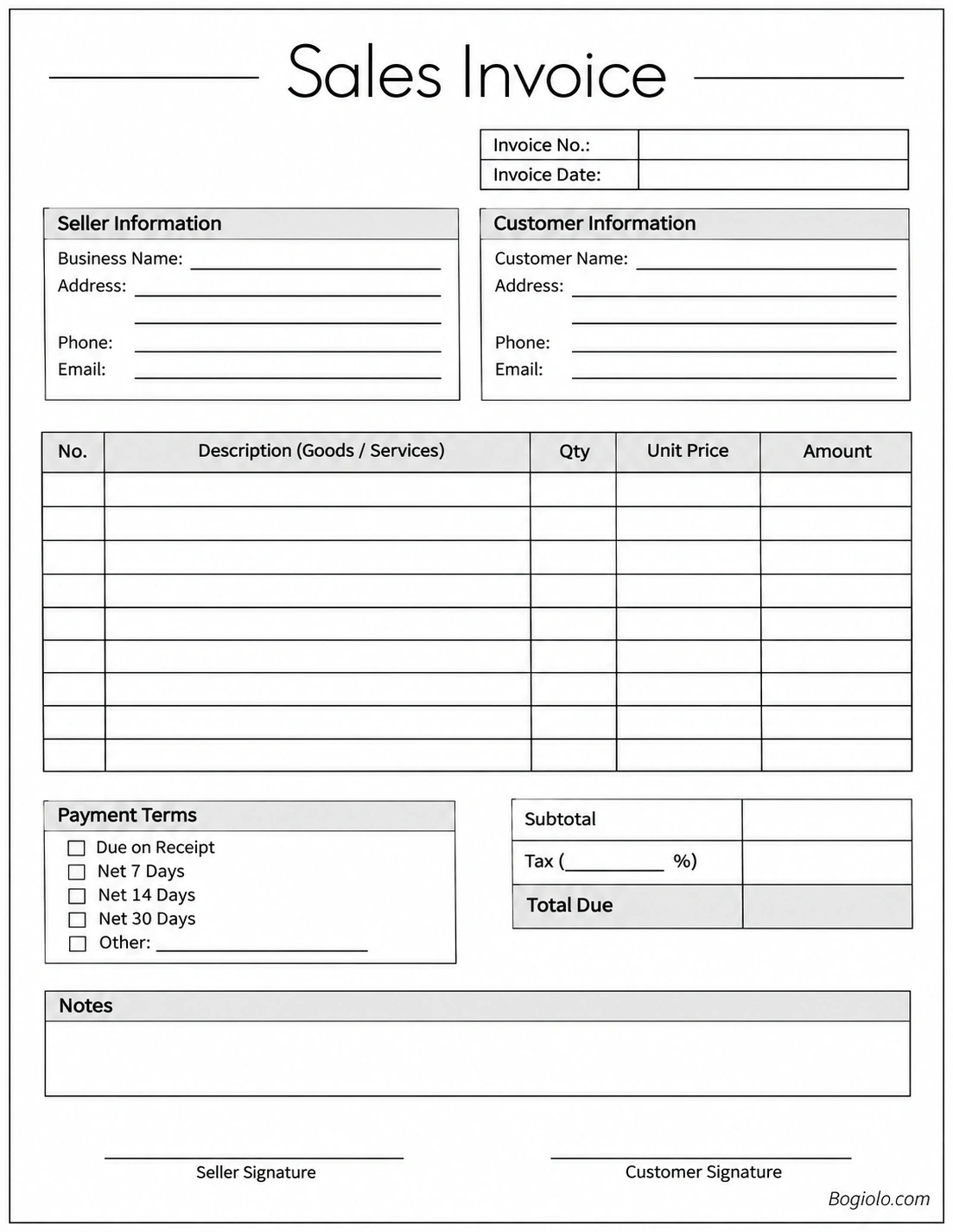
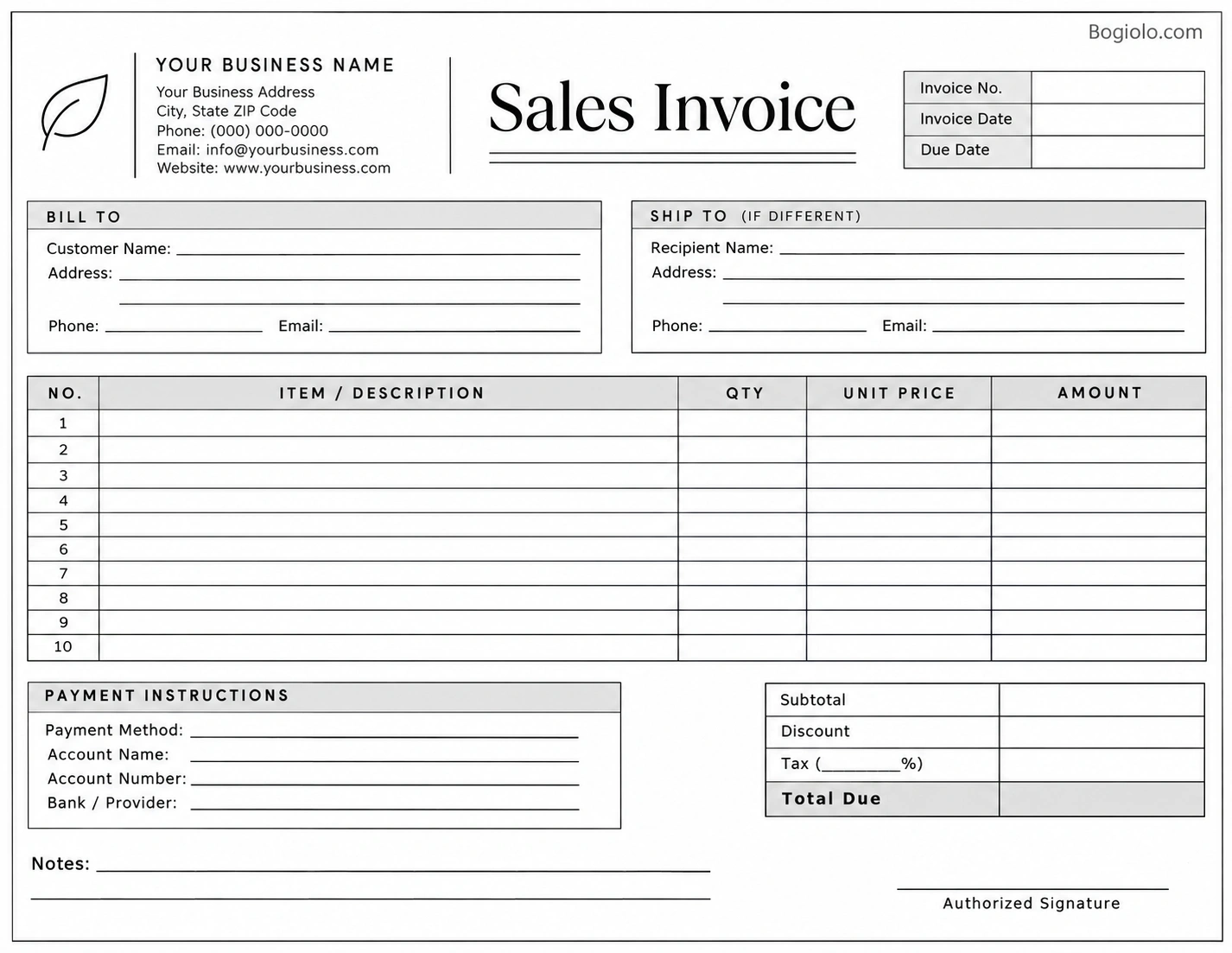
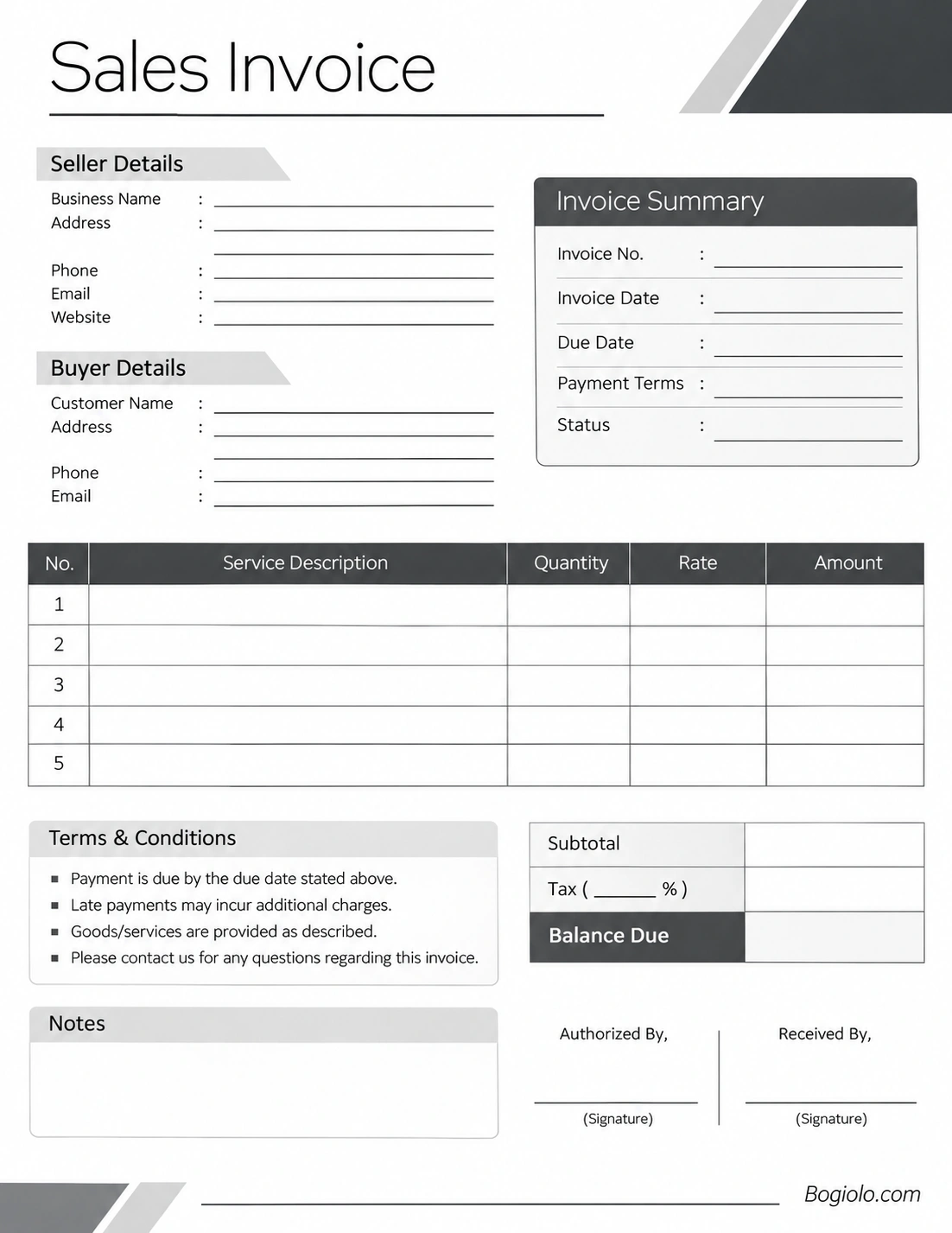
Choose the layout that best matches your business operations. Before sending an invoice, complete all relevant fields and remove any sections that do not apply to your transaction.
Sales Invoice vs. Purchase Order vs. Receipt
Although these documents are related to business transactions, they serve different purposes. Understanding the differences helps prevent confusion during the purchasing and payment process.
Sales Invoice
A sales invoice is issued by the seller to request payment for goods or services provided. It records the amount owed and the applicable payment terms.
Purchase Order
A purchase order is created by a buyer to formally request products or services from a supplier. It generally outlines the items, quantities, prices, and expected delivery details before the transaction is fulfilled.
Receipt
A receipt is issued after payment has been received. It confirms that the buyer has paid a specified amount for a transaction.
In simple terms, a purchase order requests goods or services, a sales invoice requests payment, and a receipt confirms payment.
Common Sales Invoice Mistakes to Avoid
Even a simple billing process can lead to problems when important details are overlooked. Avoid these common mistakes to maintain accurate financial records.
- Using duplicate invoice numbers: Assign a unique reference number to every invoice.
- Entering incorrect customer details: Verify names, addresses, and contact information before issuing documents.
- Making calculation errors: Recheck quantities, unit prices, discounts, taxes, and totals.
- Leaving out payment deadlines: Always specify a clear due date or payment term.
- Providing vague descriptions: Describe each product or service clearly enough for the customer to identify it.
- Failing to keep copies: Store invoice records securely for future reference and bookkeeping.
- Ignoring local tax requirements: Make sure your invoices comply with applicable business and tax regulations.
Tips for Managing Sales Invoices Efficiently
Good invoicing practices can improve cash flow management and reduce unnecessary administrative work. Consider these practical recommendations:
- Use a consistent invoice numbering system.
- Issue invoices promptly after delivering goods or completing services.
- Set clear and reasonable payment terms.
- Keep digital copies organized by invoice number or customer.
- Track unpaid invoices and follow up on overdue balances.
- Use accounting software when your transaction volume increases.
- Review your invoice records regularly to identify missing payments.
For growing businesses, automated invoicing tools can also help generate recurring invoices, send payment reminders, and organize accounts receivable.
Frequently Asked Questions About Sales Invoices
1. What is the main purpose of a sales invoice?
The main purpose of a sales invoice is to formally request payment from a customer for goods or services provided. It also documents transaction details and supports financial bookkeeping.
2. Is a sales invoice a legally binding document?
A sales invoice can serve as important evidence of a commercial transaction and the amount requested for payment. However, whether it independently creates an enforceable legal obligation depends on the applicable law, contractual agreement, and circumstances of the transaction.
3. When should a sales invoice be issued?
A sales invoice is generally issued after goods have been delivered or services have been provided. However, businesses may issue invoices at other agreed stages, depending on their contracts and applicable invoicing rules.
4. What is the difference between a sales invoice and a receipt?
A sales invoice requests payment from a customer, while a receipt confirms that payment has already been received. An invoice does not automatically mean that the customer has paid.
5. Can I create a sales invoice using Excel or Word?
Yes. You can create a sales invoice using Microsoft Excel, Word, Google Sheets, or other document applications. You can also download a printable invoice template and complete it manually.
6. Does a sales invoice need a signature?
Not every sales invoice requires a signature. Requirements depend on the transaction, business agreement, and local regulations. However, signature fields can be useful when a business needs additional acknowledgment or documentation.
7. What payment terms should I include on a sales invoice?
Common payment terms include Due on Receipt, Net 7, Net 14, and Net 30. These terms indicate when the customer is expected to complete payment. Choose terms that match your business agreement.
8. How long should I keep sales invoices?
Retention periods vary depending on local accounting and tax regulations. Businesses should keep invoices and supporting transaction records for at least the period required by applicable laws.
Conclusion
A sales invoice is more than a document requesting payment. It is an important business record that helps sellers manage accounts receivable, track revenue, document transactions, and maintain organized financial records.
By including accurate business information, customer details, itemized descriptions, payment terms, and clear totals, you can create professional invoices that make transactions easier to understand and manage.
Whether you use invoicing software or a printable sales invoice template, maintaining a consistent billing process can help your business operate more efficiently and build stronger relationships with customers.
Download: Sales Invoice Template Excel
